Visualizing time series data I

Lecture 5

Dr. Mine Çetinkaya-Rundel

Duke University
STA 313 - Spring 2026

Warm up

Dataviz of the day

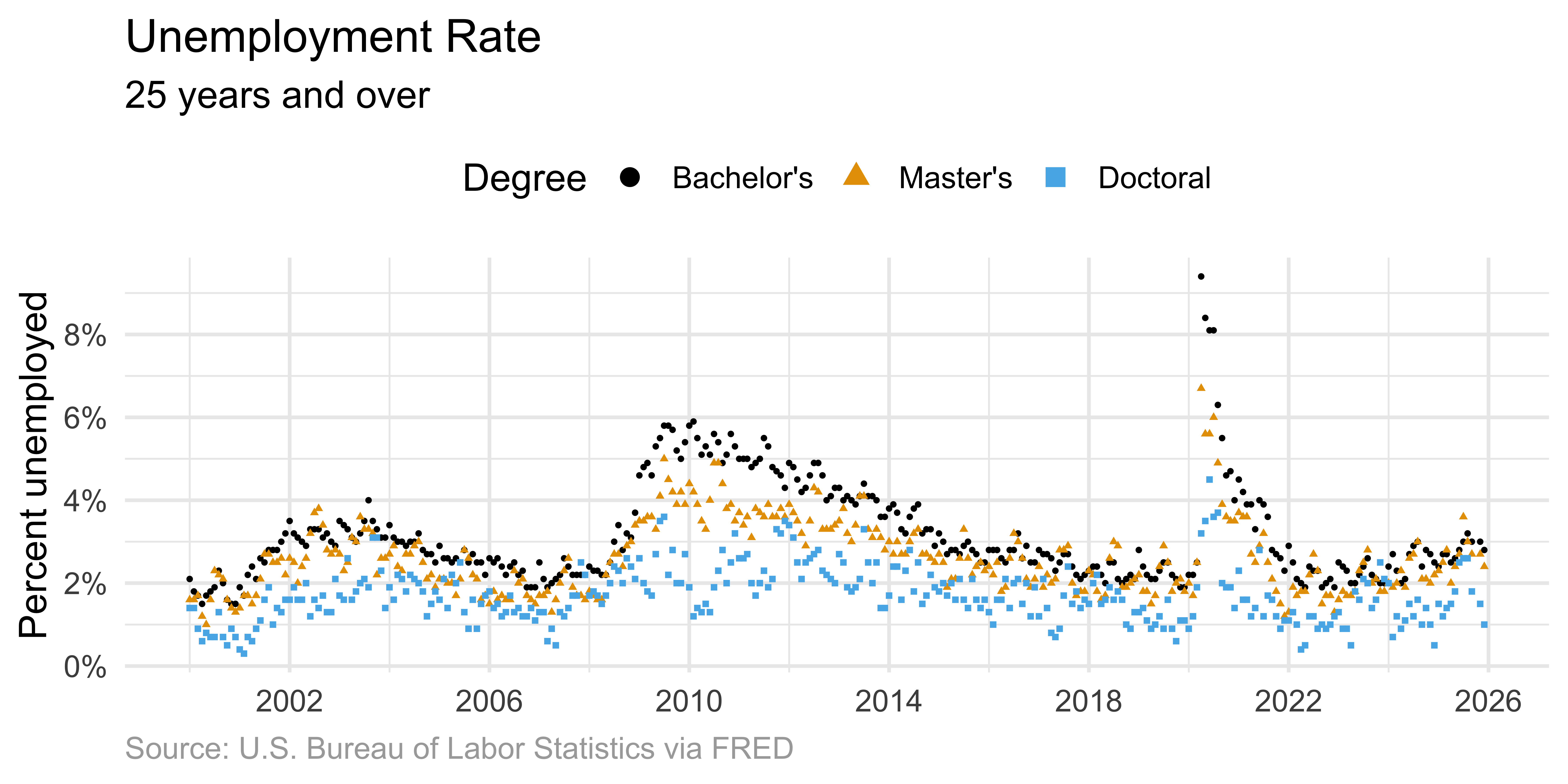
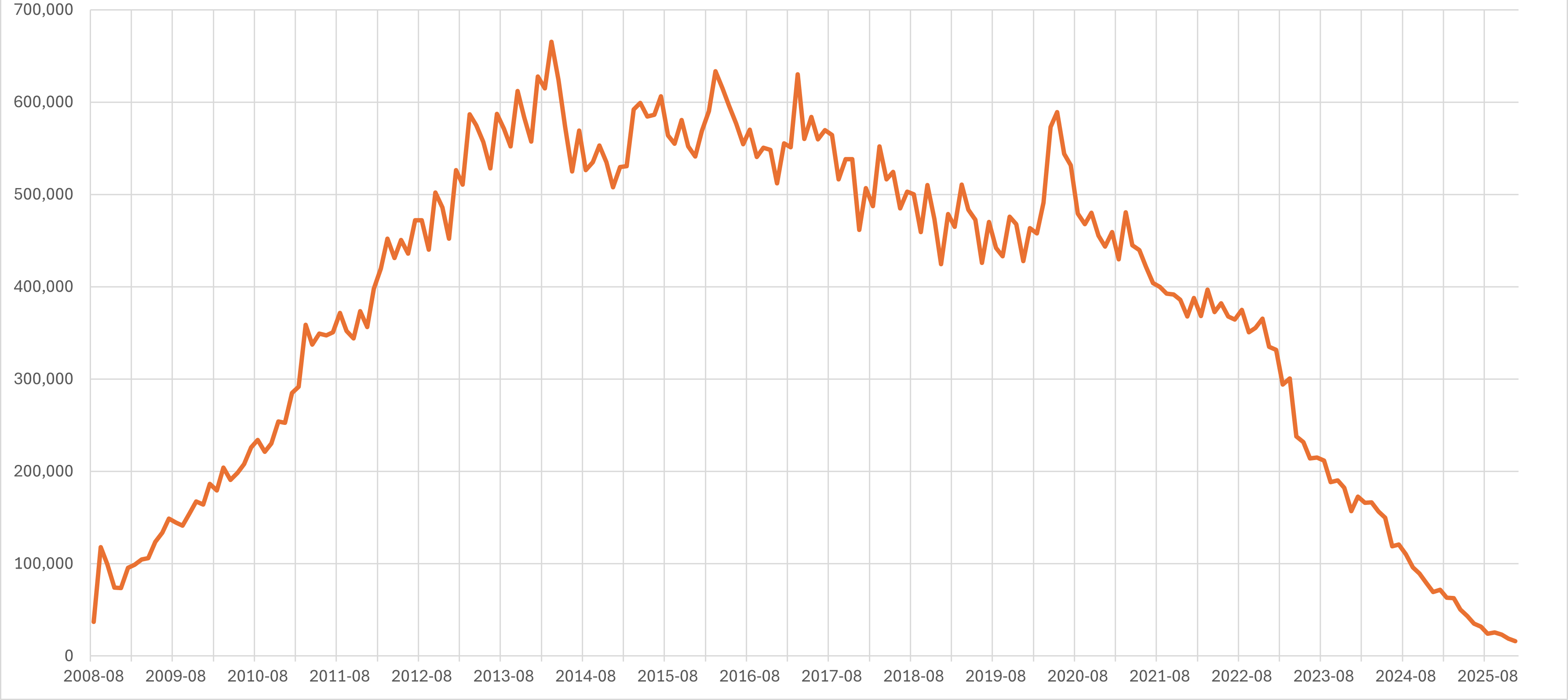
What is this a visualization of? Type your guess in the Zoom poll.
Announcements

HW 1 due today at 5 pm – your last push to your repo by 5 pm will be considered your submission

Setup

# load packages
library(tidyverse)
library(scales)
library(ggthemes)
library(colorspace)
library(ggrepel)
library(ggpp) # enhances support for data labels + annotations

# set theme for ggplot2
ggplot2::theme_set(ggplot2::theme_minimal(base_size = 14))

# set figure parameters for knitr
knitr::opts_chunk$set(
  fig.width = 7, # 7" width
  fig.asp = 0.618, # the golden ratio
  fig.retina = 3, # dpi multiplier for displaying HTML output on retina
  fig.align = "center", # center align figures
  dpi = 300 # higher dpi, sharper image
)

Before we get started

What is the date today? Cast your vote on the Zoom poll.

  • 2026-01-26
  • 2026-26-01
  • 01-26-2026
  • 26-01-2026

Important

Use ISO 8601 format for dates whenever possible:

  • Date and time values are ordered from the largest to smallest unit of time: year, month (or week), day, hour, minute, second, and fraction of second.
  • Each date and time value has a fixed number of digits that must be padded with leading zeros.
Sys.time()
[1] "2026-01-28 12:57:21 EST"

From last time

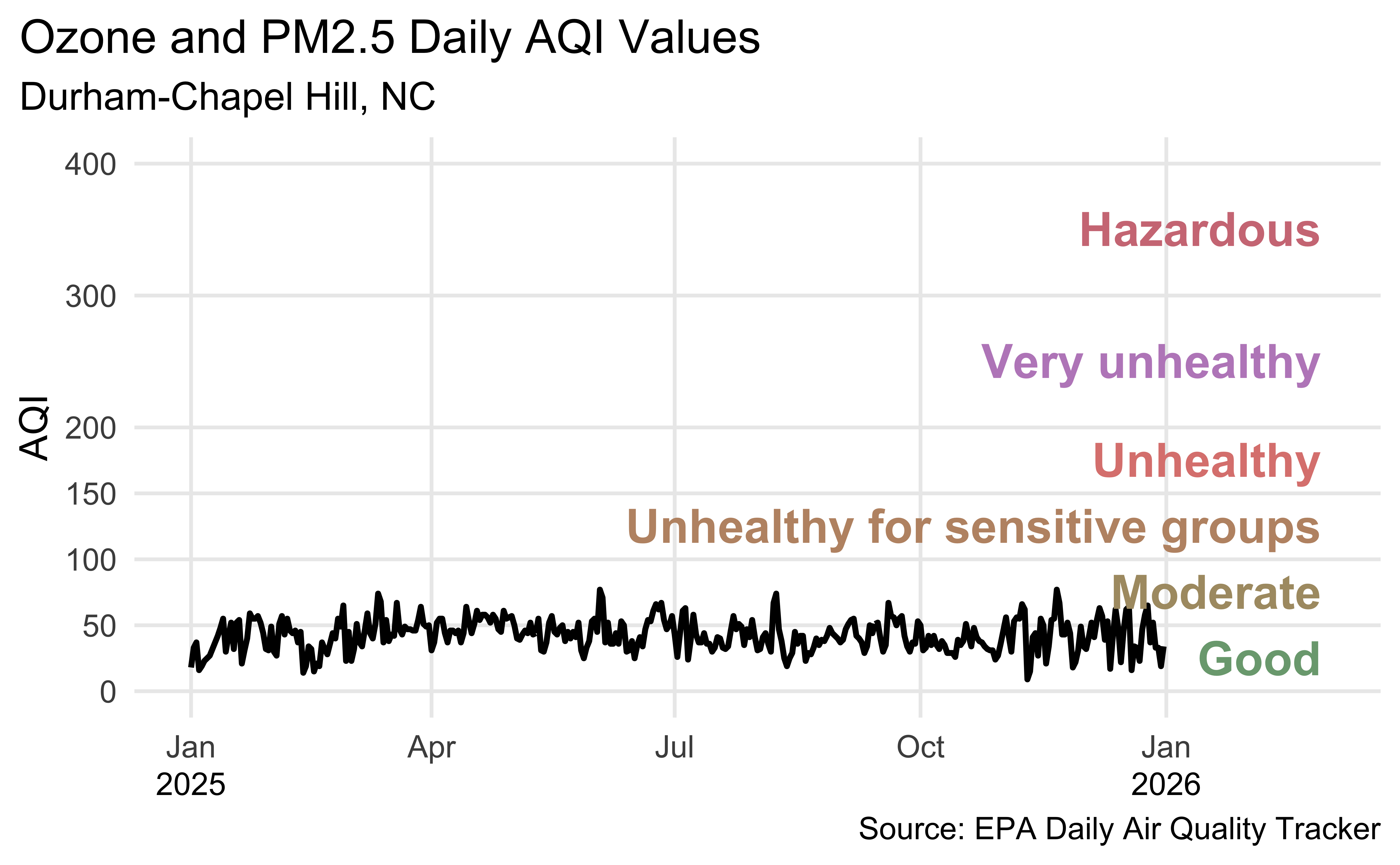
Durham-Chapel Hill AQI

In ae-03, recreate the following visualization.

Show hint
aqi_levels <- tribble(
  ~aqi_min , ~aqi_max , ~color    , ~level                           ,
         0 ,       50 , "#D8EEDA" , "Good"                           ,
        51 ,      100 , "#F1E7D4" , "Moderate"                       ,
       101 ,      150 , "#F8E4D8" , "Unhealthy for sensitive groups" ,
       151 ,      200 , "#FEE2E1" , "Unhealthy"                      ,
       201 ,      300 , "#F4E3F7" , "Very unhealthy"                 ,
       301 ,      400 , "#F9D0D4" , "Hazardous"
) |>
  mutate(aqi_mid = ((aqi_min + aqi_max) / 2))
Livecoding

Code developed during live coding session to be posted after class.

Reveal below for code developed during live coding session.

  • Prep
Code
dch_2025 <- read_csv(
  here::here(
    "slides/05/",
    "data/durham-chapel-hill/ad_aqi_tracker_data-2025.csv"
  ),
  na = c(".", "")
) |>
  janitor::clean_names() |>
  mutate(date = mdy(date))
  • Plot
Code
dch_2025 |>
  filter(!is.na(aqi_value)) |>
  ggplot(aes(x = date, y = aqi_value, group = 1)) +
  geom_line(linewidth = 1) +
  scale_x_date(
    name = NULL,
    date_labels = "%b",
    limits = c(ymd("2025-01-01"), ymd("2026-03-01"))
  ) +
  scale_y_continuous(breaks = c(0, 50, 100, 150, 200, 300, 400)) +
  geom_text(
    data = aqi_levels,
    aes(
      x = ymd("2026-02-28"),
      y = aqi_mid,
      label = level,
      color = darken(color, 0.3)
    ),
    hjust = 1,
    size = 6,
    fontface = "bold"
  ) +
  scale_color_identity() +
  annotate(
    geom = "text",
    x = c(ymd("2025-01-01"), ymd("2026-01-01")),
    y = -70,
    label = c("2025", "2026"),
    size = 4
  ) +
  coord_cartesian(clip = "off", ylim = c(0, 400)) +
  labs(
    x = NULL,
    y = "AQI",
    title = "Ozone and PM2.5 Daily AQI Values",
    subtitle = "Durham-Chapel Hill, NC",
    caption = "\nSource: EPA Daily Air Quality Tracker"
  ) +
  theme(
    plot.title.position = "plot",
    panel.grid.minor.y = element_blank(),
    panel.grid.minor.x = element_blank()
  )

Time series

What makes time special?

Time imposes additional structure on the data.

  • For each point we can define a predecessor and successor
  • Enables ordered relationships between observations
  • Suggests connecting data points visually

Data overview

From FRED, Federal Reserve Bank of St. Louis:

Data: Unemployment Rate - Bachelor’s Degree, 25+ years (CGBD25O)

unemp_bachelor <- read_csv(here::here(
  "slides/05",
  "data/fred",
  "CGBD25O.csv"
)) |>
  rename(date = observation_date, unemp_rate = CGBD25O) |>
  mutate(degree = "Bachelor's")
unemp_bachelor
# A tibble: 312 × 3
   date       unemp_rate degree    
   <date>          <dbl> <chr>     
 1 2000-01-01        2.1 Bachelor's
 2 2000-02-01        1.8 Bachelor's
 3 2000-03-01        1.7 Bachelor's
 4 2000-04-01        1.5 Bachelor's
 5 2000-05-01        1.7 Bachelor's
 6 2000-06-01        1.8 Bachelor's
 7 2000-07-01        1.9 Bachelor's
 8 2000-08-01        2.3 Bachelor's
 9 2000-09-01        2   Bachelor's
10 2000-10-01        1.6 Bachelor's
# ℹ 302 more rows

Data: Unemployment Rate - Master’s Degree, 25+ years (CGMD25O)

unemp_master <- read_csv(here::here(
  "slides/05",
  "data/fred",
  "CGMD25O.csv"
)) |>
  rename(date = observation_date, unemp_rate = CGMD25O) |>
  mutate(degree = "Master's")
unemp_master
# A tibble: 312 × 3
   date       unemp_rate degree  
   <date>          <dbl> <chr>   
 1 2000-01-01        1.6 Master's
 2 2000-02-01        1.6 Master's
 3 2000-03-01        1.7 Master's
 4 2000-04-01        1.2 Master's
 5 2000-05-01        1   Master's
 6 2000-06-01        1.6 Master's
 7 2000-07-01        2.3 Master's
 8 2000-08-01        2.2 Master's
 9 2000-09-01        2.1 Master's
10 2000-10-01        1.6 Master's
# ℹ 302 more rows

Data: Unemployment Rate - Doctoral Degree, 25+ years (CGDD25O)

unemp_doctoral <- read_csv(here::here(
  "slides/05",
  "data/fred",
  "CGDD25O.csv"
)) |>
  rename(date = observation_date, unemp_rate = CGDD25O) |>
  mutate(degree = "Doctoral")
unemp_doctoral
# A tibble: 312 × 3
   date       unemp_rate degree  
   <date>          <dbl> <chr>   
 1 2000-01-01        1.4 Doctoral
 2 2000-02-01        1.4 Doctoral
 3 2000-03-01        0.9 Doctoral
 4 2000-04-01        0.6 Doctoral
 5 2000-05-01        0.8 Doctoral
 6 2000-06-01        0.7 Doctoral
 7 2000-07-01        0.7 Doctoral
 8 2000-08-01        1.3 Doctoral
 9 2000-09-01        0.7 Doctoral
10 2000-10-01        0.5 Doctoral
# ℹ 302 more rows

Data: All

unemp <- bind_rows(unemp_bachelor, unemp_master, unemp_doctoral) |>
  mutate(degree = fct_relevel(degree, "Bachelor's", "Master's", "Doctoral"))
unemp
# A tibble: 936 × 3
   date       unemp_rate degree    
   <date>          <dbl> <fct>     
 1 2000-01-01        2.1 Bachelor's
 2 2000-02-01        1.8 Bachelor's
 3 2000-03-01        1.7 Bachelor's
 4 2000-04-01        1.5 Bachelor's
 5 2000-05-01        1.7 Bachelor's
 6 2000-06-01        1.8 Bachelor's
 7 2000-07-01        1.9 Bachelor's
 8 2000-08-01        2.3 Bachelor's
 9 2000-09-01        2   Bachelor's
10 2000-10-01        1.6 Bachelor's
# ℹ 926 more rows

Visualizing individual time series

Evolution of approaches

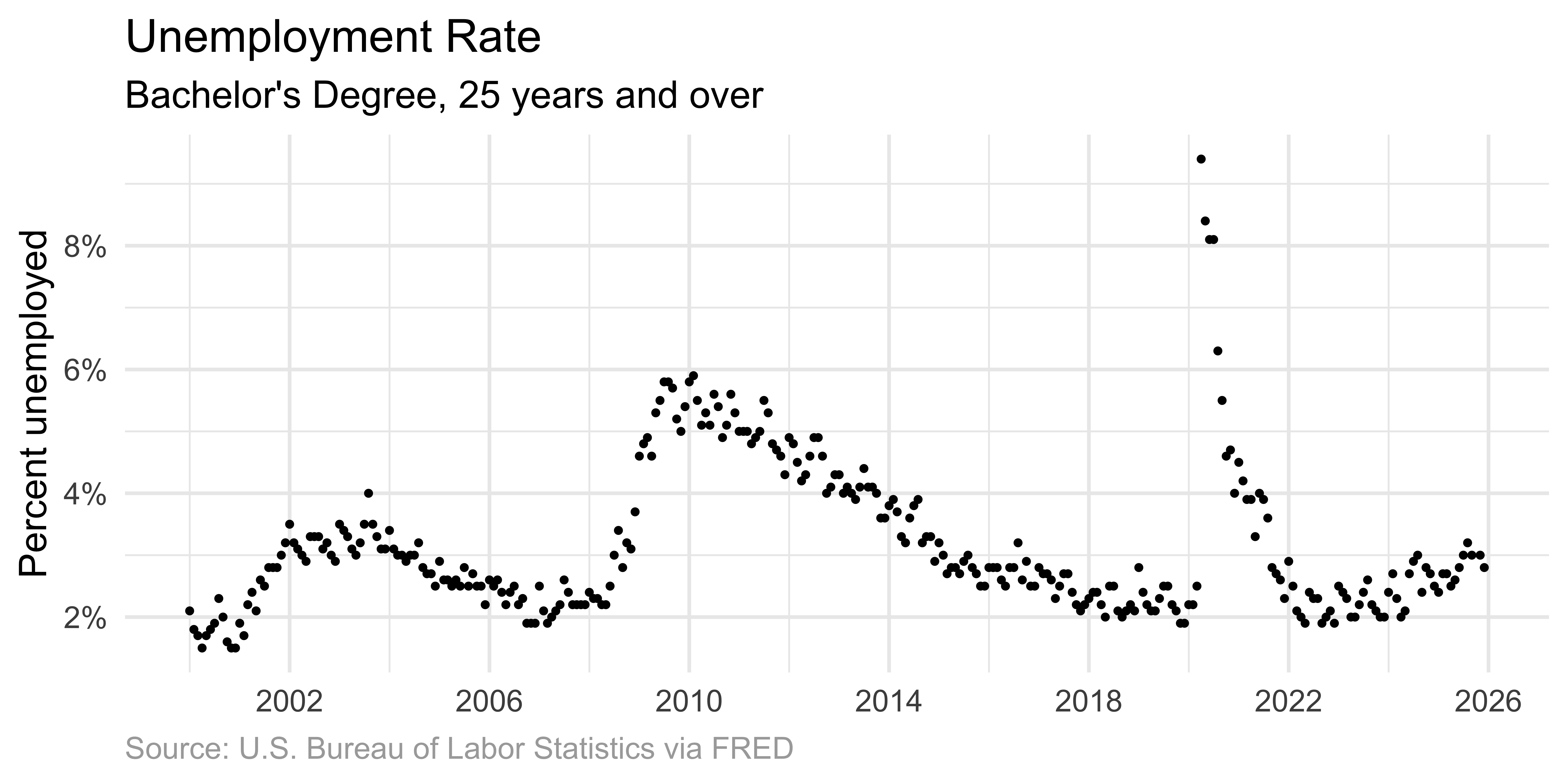
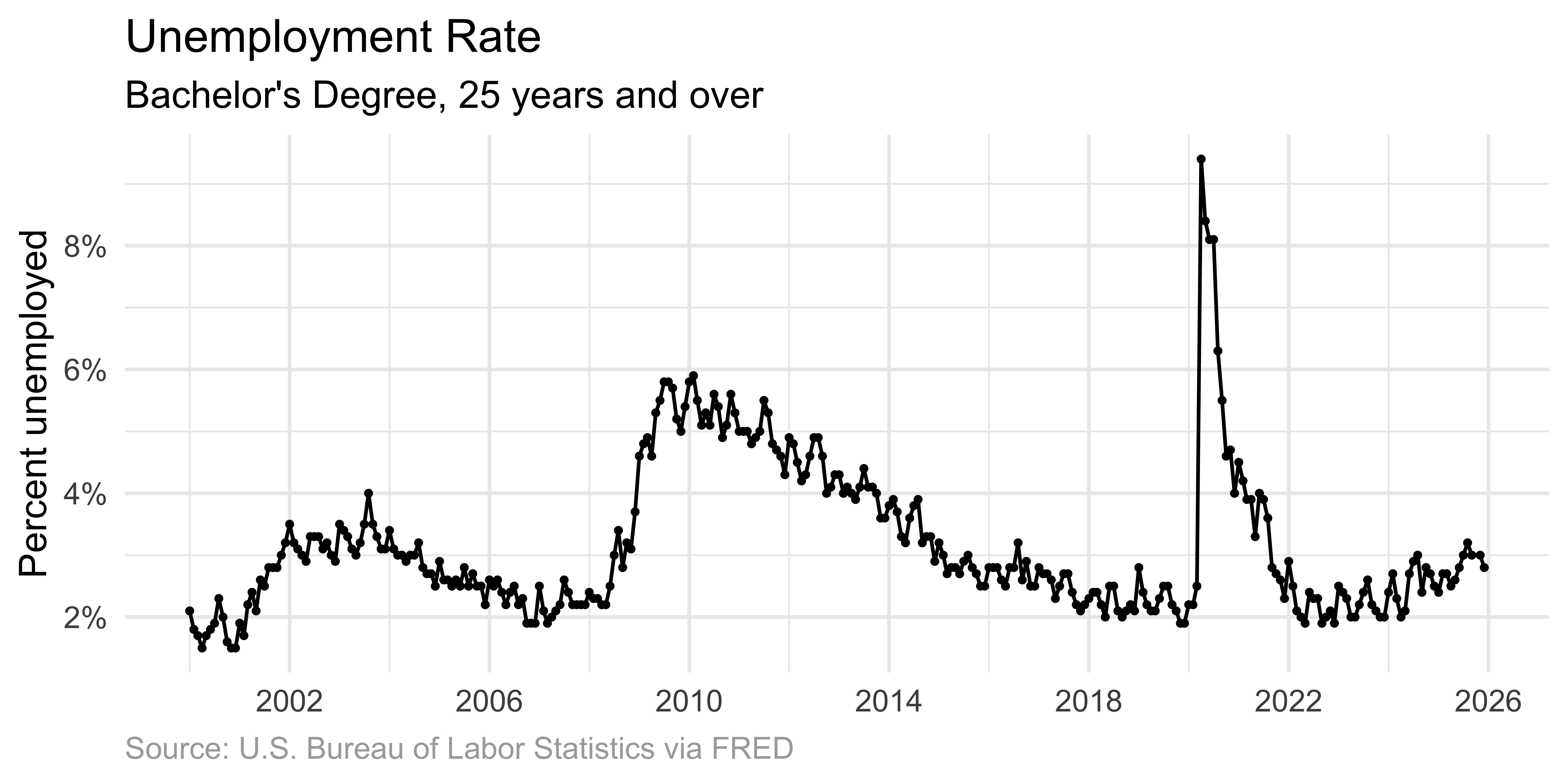
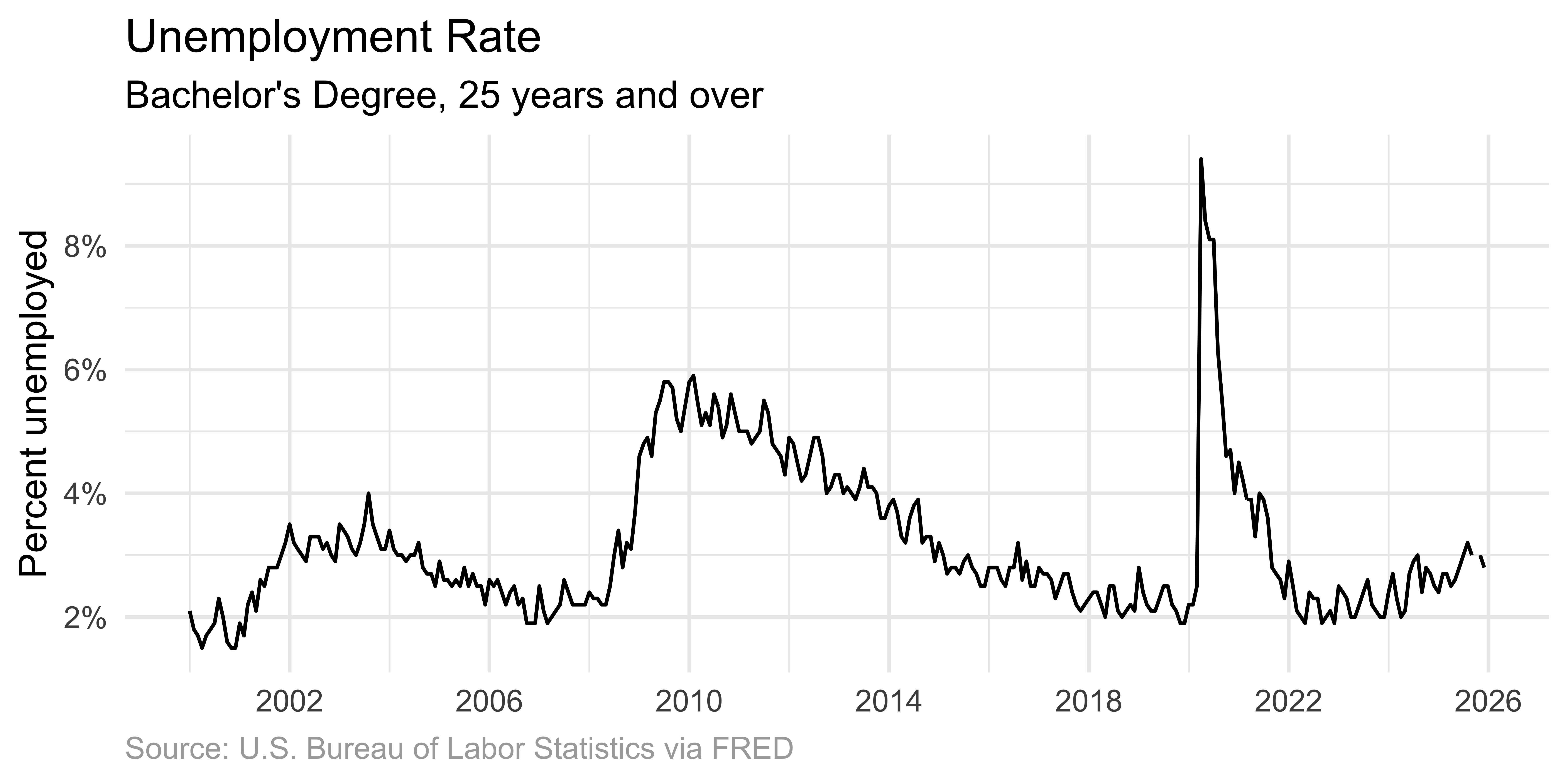
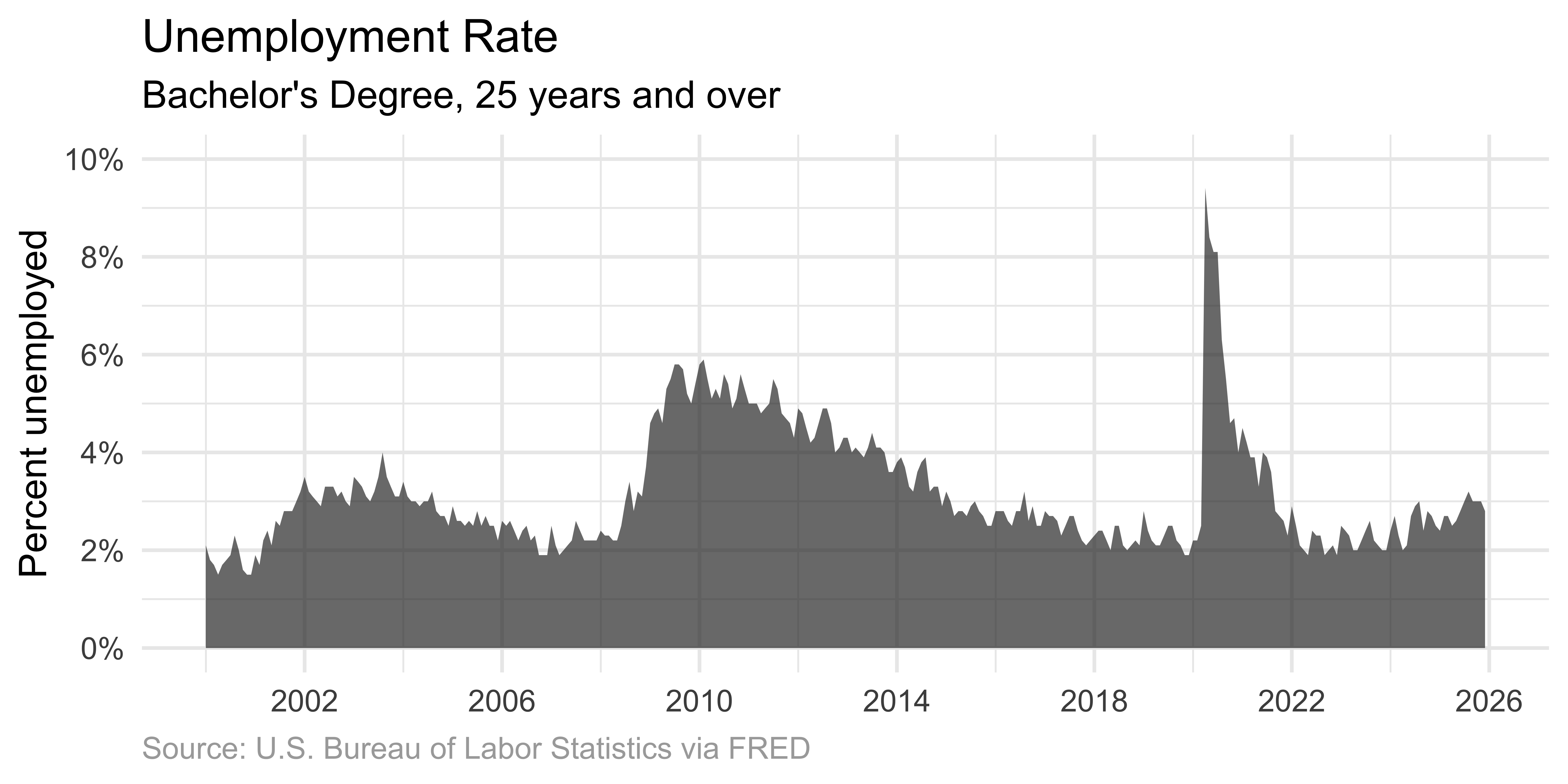
Starting with a dataset of monthly values over time, we can visualize with increasing levels of connection:

  1. Scatter plot: Individual dots for each observation
  2. Line + dots: Connect points with lines, show individual observations
  3. Line only: Emphasize overall trend, de-emphasize individual points
  4. Area graph: Fill beneath the curve for additional emphasis

Scatter plot

Individual dots mark each observation.
p_unemp_bachelor <- ggplot(
  unemp_bachelor,
  aes(x = date, y = unemp_rate)
) +
  scale_x_date(date_breaks = "4 years", label = label_date(format = "%Y")) +
  labs(
    title = "Unemployment Rate",
    subtitle = "Bachelor's Degree, 25 years and over",
    x = NULL,
    y = "Percent unemployed",
    caption = "Source: U.S. Bureau of Labor Statistics via FRED"
  ) +
  theme(
    plot.caption = element_text(color = "darkgray", hjust = 0)
  )

p_unemp_bachelor +
  geom_point(size = 0.7) +
  scale_y_continuous(
    labels = label_percent(scale = 1),
    breaks = seq(0, 10, 2)
  )

Line graph with points

Connecting points emphasizes the ordered relationship.
p_unemp_bachelor +
  geom_point(size = 0.7) +
  geom_line() +
  scale_y_continuous(
    labels = label_percent(scale = 1),
    breaks = seq(0, 10, 2)
  )

Line graph only

Omitting dots emphasizes the overall temporal trend.
p_unemp_bachelor +
  geom_line() +
  scale_y_continuous(
    labels = label_percent(scale = 1),
    breaks = seq(0, 10, 2)
  )

Area graph

Shading beneath the curve highlights the magnitude of values.
p_unemp_bachelor +
  geom_area(alpha = 0.7) +
  scale_y_continuous(
    limits = c(0, 10),
    labels = label_percent(scale = 1),
    breaks = seq(0, 10, 2)
  )

Important

When using area graphs, the y-axis must start at zero. The filled area represents quantity – if the axis doesn’t start at zero, the visual representation misrepresents the data.

Lines don’t show data

Warning

Lines between points do not represent observed data – they are interpolations.

  • Lines facilitate perception of trends
  • Clarify in figure captions: “Lines meant as a guide to the eye”
  • For dense time series, omitting individual points is appropriate

When to show points vs. lines

Scenario Recommendation
Few data points Show both lines and points
Many data points Lines only
Irregular intervals Show points to reveal gaps
Emphasis on trend Lines or area
Emphasis on individual values Points (with or without lines)

Multiple time series

Scatter plot

The challenge

When visualizing several concurrent time series:

  • Scatter plots create visual interference, making it difficult to follow individual series
  • Visual connection between related points help

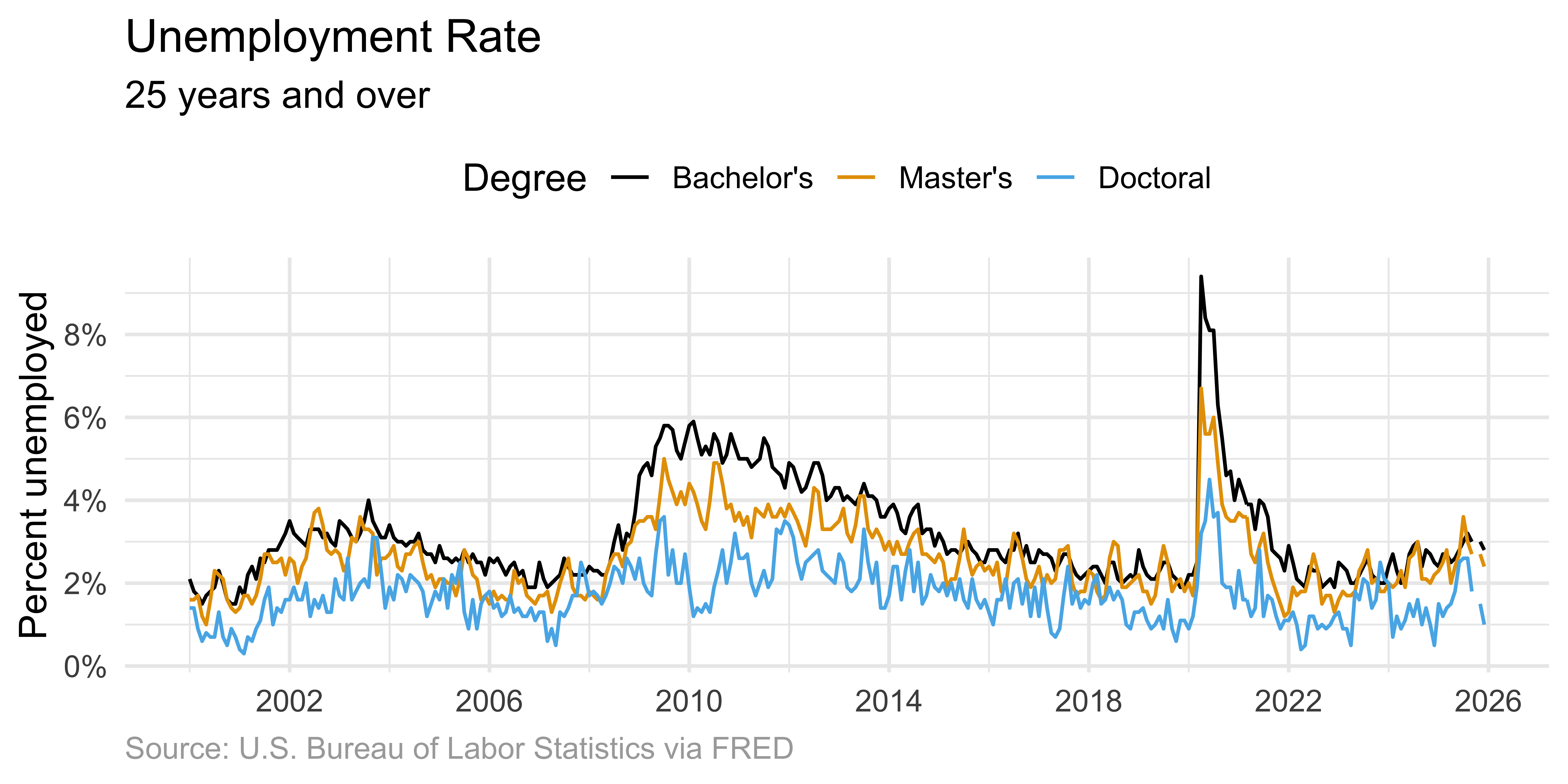
Solution: Connected lines

Connected lines help readers follow each individual time course.
ggplot(
  unemp,
  aes(x = date, y = unemp_rate, color = degree, shape = degree)
) +
  geom_line() +
  scale_x_date(date_breaks = "4 years", label = label_date(format = "%Y")) +
  scale_y_continuous(
    labels = label_percent(scale = 1),
    breaks = seq(0, 10, 2)
  ) +
  scale_color_colorblind() +
  labs(
    title = "Unemployment Rate",
    subtitle = "25 years and over",
    x = NULL,
    y = "Percent unemployed",
    color = "Degree",
    caption = "Source: U.S. Bureau of Labor Statistics via FRED"
  ) +
  theme(
    plot.caption = element_text(color = "darkgray", hjust = 0),
    legend.position = "top"
  )

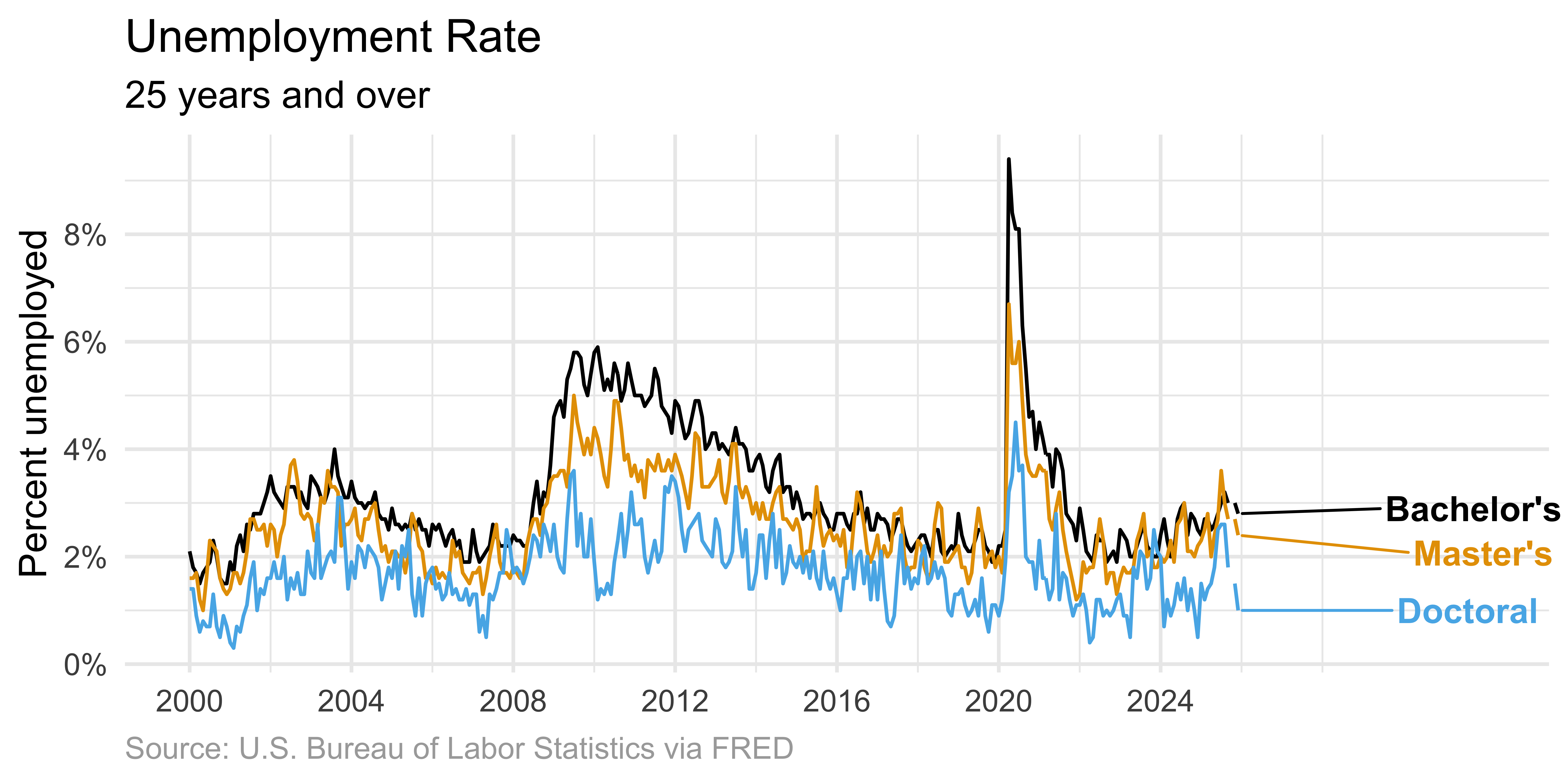
Direct labeling

Direct labeling reduces cognitive load compared to legends.
unemp |>
  # add label for the last entry in each degree type
  mutate(
    label = case_when(
      date == max(date) & degree == "Bachelor's" ~ "Bachelor's",
      date == max(date) & degree == "Master's" ~ "Master's",
      date == max(date) & degree == "Doctoral" ~ "Doctoral",
      .default = NA
    )
  ) |>
  ggplot(aes(x = date, y = unemp_rate, color = degree, shape = degree)) +
  geom_line() +
  # add labels to plot, avoiding overlap
  geom_text_repel(
    aes(label = label),
    hjust = -1,
    na.rm = TRUE,
    fontface = "bold",
    size = 4.5
  ) +
  # adjust x-axis limits (to make room for labels) + breaks (for data only)
  scale_x_date(
    label = label_date(format = "%Y"),
    limits = c(NA_Date_, ymd("2032-01-01")),
    breaks = seq(ymd("2000-01-01"), ymd("2026-01-01"), by = "4 years")
  ) +
  scale_y_continuous(
    labels = label_percent(scale = 1),
    breaks = seq(0, 10, 2)
  ) +
  scale_color_colorblind() +
  labs(
    title = "Unemployment Rate",
    subtitle = "25 years and over",
    x = NULL,
    y = "Percent unemployed",
    color = "Degree",
    caption = "Source: U.S. Bureau of Labor Statistics via FRED"
  ) +
  theme(
    plot.caption = element_text(color = "darkgray", hjust = 0),
    legend.position = "none" # turn off line and text geom legends
  ) +
  coord_cartesian(clip = "off") # don't cut off labels

Connected scatter plots

What are connected scatter plots?

Also called phase portraits:

  • Display two response variables against each other
  • Connect values recorded at the same point in time
  • Reveal relationships not visible in separate line graphs

Interpreting connected scatter plots

Pattern Interpretation
Diagonal movement (↗ or ↙) Variables are correlated
Perpendicular movement Variables are anti-correlated
Circular/elliptical patterns Cyclic relationship
Clustered points Stable periods

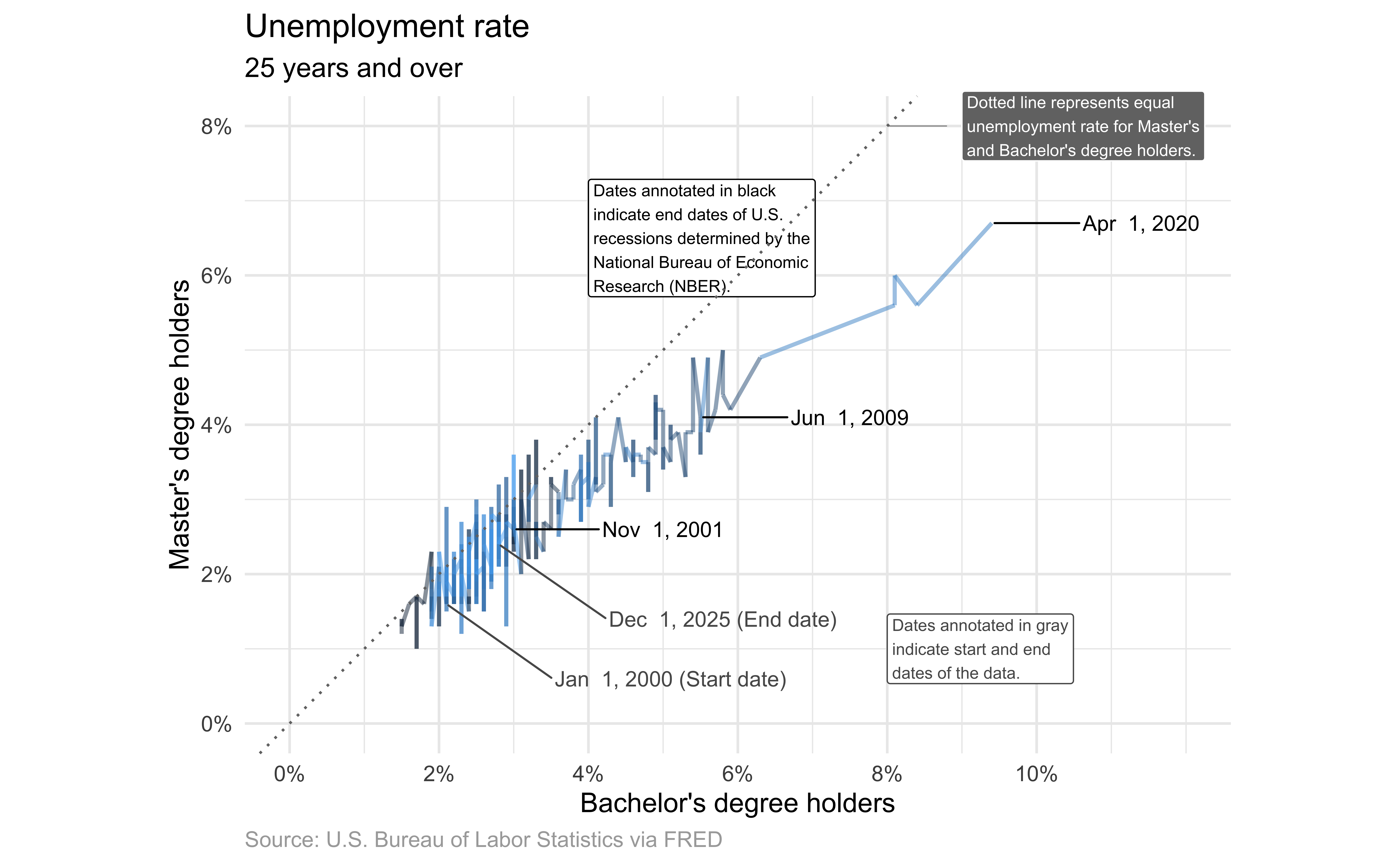
Unemployment for Bachelor’s & Master’s

In ae-04, recreate the following visualization.
Livecoding

Code developed during live coding session to be posted after class.