Welcome to STA 313

Lecture 1

Dr. Mine Çetinkaya-Rundel

Duke University
STA 313 - Spring 2026

Course Details

Teaching team

Instructor

Dr. Mine Çetinkaya-Rundel

Old Chem 211C

mc301@duke.edu

Teaching assistants

Leah Johnson

Head TA +
Lab 1 TA

Luxman Maheswaran

Lab 2 TA
Alexa Fahrer

Timetable

  • Lectures (weekly)
    • Mondays, 1:25 - 2:40 pm - Old Chemistry 116
    • Wednesdays, 1:25 - 2:40 pm - Old Chemistry 116
  • Labs (weekly)
    • Lab 1: Thursdays, 10:05 - 11:20 am - Old Chemistry 201
    • Lab 2: Thursdays, 11:45 am - 1:00 pm - Old Chemistry 201

Themes: what, why, and how

  • What: the plot
    • Specific types of visualizations for a particular purpose (e.g., maps for spatial data, Sankey diagrams for proportions, etc.)
    • Tooling to produce them (e.g., specific R packages)
  • How: the process
    • Start with a design (sketch + pseudo code)
    • Pre-process data (e.g., wrangle, reshape, join, etc.)
    • Map data to aesthetics
    • Make visual encoding decisions t(e.g., address accessibility concerns)
    • Post-process for visual appeal and annotation
  • Why: the theory
    • Tie together “how” and “what” through the grammar of graphics

But first…

Show and tell

  • Form a small group (2-4 people) with people sitting around you

  • First, introduce yourselves to each other – name (and proper pronunciation of name), year, major, where are you from, etc.

  • Start with the bad graphs – Share your examples of “bad” graphs and why you think they’re bad.

  • Then, share your good graphs – Same deal, share your examples of “good” graphs and why you think they’re good.

  • Finally, choose the one plot from your group that you think is most striking, either because it’s bad or because it’s good. Post on Ed Discussion in the “Lecture 01-07: Good and/or bad visualization example(s)” thread.

Course components

Course website

aka “the one link to rule them all”

Lectures

  • In person

  • Attendance is required

  • A little bit of everything:

    • Traditional lecture
    • Live coding + demos
    • Short exercises + solution discussion

Labs

  • Attendance is required

  • Opportunity to work on course assignments with TA support

  • Opportunity to work with teammates on projects

Announcements

  • Posted on Canvas (Announcements tool) and sent via email, be sure to check both regularly

  • I’ll assume that you’ve read an announcement by the next “business” day

Diversity and inclusion

It is my intent that students from all diverse backgrounds and perspectives be well-served by this course, that students’ learning needs be addressed both in and out of class, and that the diversity that the students bring to this class be viewed as a resource, strength and benefit.

  • If you have a name that differs from those that appear in your official Duke records, please let me know!

  • Please let me know your preferred pronouns.

  • If you feel like your performance in the class is being impacted by your experiences outside of class, please don’t hesitate to come and talk with me. I want to be a resource for you. If you prefer to speak with someone outside of the course, your advisers and deans are excellent resources.

  • I (like many people) am still in the process of learning about diverse perspectives and identities. If something was said in class (by anyone) that made you feel uncomfortable, please talk to me about it.

Accessibility

  • The Student Disability Access Office (SDAO) is available to ensure that students are able to engage with their courses and related assignments.

  • I am committed to making all course materials accessible and I’m always learning how to do this better. If any course component is not accessible to you in any way, please don’t hesitate to let me know.

Assessments

Quizzes (15%)

  • 12-15 short quizzes to assess your understanding of the readings and lecture material

  • Not be pre-announced and will take place on pseudo-random days during lecture or lab

  • Grading based on attendance and correctness

  • Lowest 3-4 quizzes (roughly 25% dropped, depending on how many quizzes we end up with) dropped

  • No make-ups or late submissions for missed quizzes.

Homework assignments (25%)

  • 6 homework assignments due every other week (roughly)

  • Completed individually

  • Due by 5 pm ET on the indicated day on the course schedule

  • Lowest homework assignment dropped

Mini-projects (5% each)

  • 2 mini-projects: One in the first half of the semester and one in the second half

  • Completed individually

  • Deliverables: Video walking through code and explaining process and findings + short write-up (think 5-10 minute read blog post)

  • Mini-project 1: Live-code a visualization from scratch based on that week’s #TidyTuesday data and write a short blog post elevating main highlights and take-aways of the video and final product

  • Mini-project 2: Create a video and write a short blog post on “visualizing X data”, where X is a dataset type of your choosing (e.g., network, hierarchical, text, etc.) that we will not explicitly cover in class.

More details to be posted.

Projects

  • 2 projects: One mid-semester and one at the end of the semester

  • Completed in teams

  • Interim deadlines, peer review on content, peer evaluation for team contribution

  • Some lab sessions allocated to working on projects, doing peer review, getting feedback from TAs

  • Project 1 (20%) is more prescripted, Project 2 (30%) is more open-ended

More details to be posted.

Project 2 due during lab time on reading day?

Teams

  • Team assignments
    • In class exercises and projects
    • Assigned different teams for each project
    • Peer evaluation during teamwork and after completion
  • Expectations and roles
    • Everyone is expected to contribute equal effort
    • Everyone is expected to understand all code turned in
    • Individual contribution evaluated by peer evaluation, commits, etc.

Grading I

The final course grade will be calculated as follows:

Category Percentage
Quizzes 15%
Homework assignments 25%
Mini-project 1 5%
Project 1 20%
Mini-project 2 5%
Project 2 30%

Grading II

The final letter grade will be determined based on the following thresholds:

Letter Grade Final Course Grade
A >= 93
A- 90 - 92.99
B+ 87 - 89.99
B 83 - 86.99
B- 80 - 82.99
C+ 77 - 79.99
C 73 - 76.99
C- 70 - 72.99
D+ 67 - 69.99
D 63 - 66.99
D- 60 - 62.99
F < 60

These are upper bounds for grade cutoffs, depending on the class performance the cutoffs may be lowered but they won’t be increased.

Community participation

This is not required but highly recommended!

  • TidyTuesday - New dataset every week for wrangling, visualizing, modeling
  • I encourage you to participate, or at a minimum, browse others’ contributions on Twitter or Mastodon with #TidyTuesday

Course policies

Late work and make-ups

Policy on late work depends on the particular course component:

  • Quizzes: No late work + no make-up

  • Homeworks and mini-projects: GitHub repositories will be closed to contributions at the deadline. If you need to submit your work late, email the professor to reopen your repository.

    • Late, within 24 hours of deadline: -10% of available points
    • Late, within 24-48 hours of deadline: -20% of available points
    • More than 48 hours later: No credit, and we will not provide written feedback
  • Projects:

    • Presentation: No late work + no make-up

    • Write up: GitHub repositories will be closed to contributions at the deadline. If you need to submit your work late, email the professor to reopen your repository.

      • Late, within 24 hours of deadline: -10% of available points
      • Late, within 24-48 hours of deadline: -20% of available points
      • More than 48 hours later: No credit, and we will not provide written feedback
    • Peer evaluation: No late work + no make-up. If you do not turn in your peer evaluation, you get 0 points for your own peer score as well, regardless of how your teammates have evaluated you.

Collaboration policy

  • Only work that is clearly assigned as team work should be completed collaboratively (Projects)

  • Homework assignments and mini-projects must be completed individually. You may not directly share answers / code with others, however you are welcome to discuss the problems in general and ask for advice

Sharing / reusing code policy

  • We are aware that a huge volume of code is available on the web, and many tasks may have solutions posted

  • Unless explicitly stated otherwise, this course’s policy is that you may make use of any online resources but you must explicitly cite where you obtained any code you directly use or use as inspiration in your solution(s)

  • Any recycled code that is discovered and is not explicitly cited will be treated as plagiarism, regardless of source

Use of generative artificial intelligence (AI)

  • Treat generative AI, such as ChatGPT, the same as other online resources.

  • Guiding principles:

    • (1) Cognitive dimension: Working with AI should not reduce your ability to think clearly. We will practice using AI to facilitate—rather than hinder—learning.

    • (2) Ethical dimension: Students using AI should be transparent about their use and make sure it aligns with academic integrity.

  • ✅ AI tools for code: You may make use of the technology for coding examples on assignments; if you do so, you must explicitly cite where you obtained the code. See the syllabus for guidelines for citing AI-generated content.

  • ❌ AI tools for narrative: Unless instructed otherwise, you may not use generative AI to write narrative on assignments. In general, you may use generative AI as a resource as you complete assignments but not to answer the exercises for you.

Academic integrity

To uphold the Duke Community Standard:

  • I will not lie, cheat, or steal in my academic endeavors;
  • I will conduct myself honorably in all my endeavors; and
  • I will act if the Standard is compromised.


most importantly:

ask if you’re not sure if something violates a policy!

Support

Office hours

  • Mine:

    • Fridays 1:30 - 3:00 pm - Old Chem 211C

    • Any exceptions will be announced in class / course announcement

  • TAs: TBA!

  • Office hours start next Monday

  • + lots more resources listed on the syllabus!

Wellness

I want to make sure that you learn everything you were hoping to learn from this class. If this requires flexibility, please don’t hesitate to ask.

  • You never owe me personal information about your health (mental or physical) but you’re always welcome to talk to me. If I can’t help, I likely know someone who can.

  • I want you to learn lots of things from this class, but I primarily want you to stay healthy, balanced, and grounded.

Course tools

Languages: R and Python

  • Majority of the coding will be done in R

  • Later in the semester we’ll briefly dive into Python for data visualization

IDE: Positron

  • Locally install or use the departmental server at rstudio.stat.duke.edu

  • Server access requires Duke NetID login (and VPN if off-campus)

GitHub

  • GitHub organization for the course

  • All of your work and your membership (enrollment) in the organization is private

  • Each assignment is a private repo on GitHub, I distribute the assignments on GitHub and you submit them there

  • Feedback on assignments is given as GitHub issues, scores recorded on Sakai Gradebook

Fill out the Getting to know you survey for collection of your account names, later this week you will be invited to the course organization.

Username advice

in case you don’t yet have a GitHub account…

Some brief advice about selecting your account names (particularly for GitHub),

  • Incorporate your actual name! People like to know who they’re dealing with and makes your username easier for people to guess or remember

  • Reuse your username from other contexts, e.g., Twitter or Slack

  • Pick a username you will be comfortable revealing to your future boss

  • Shorter is better than longer, but be as unique as possible

  • Make it timeless; avoid highlighting your current university, employer, or place of residence

Ed Discussion

  • Access via Canvas

  • Use for asking questions about course content, assignments, logistics, etc.

  • Personal questions (e.g., extensions, illnesses, etc.) should be via email to me

  • For coding questions provide minimal reproducible examples and format code properly

Grammar of graphics

Data visualization

“The simple graph has brought more information to the data analyst’s mind than any other device.” — John Tukey

  • Data visualization is the creation and study of the visual representation of data

  • Many tools for visualizing data – R is one of them

  • Many approaches/systems within R for making data visualizations – ggplot2 is one of them, and that’s what we’re going to use

ggplot2 ∈ tidyverse

  • ggplot2 is tidyverse’s data visualization package

  • gg in “ggplot2” stands for Grammar of Graphics

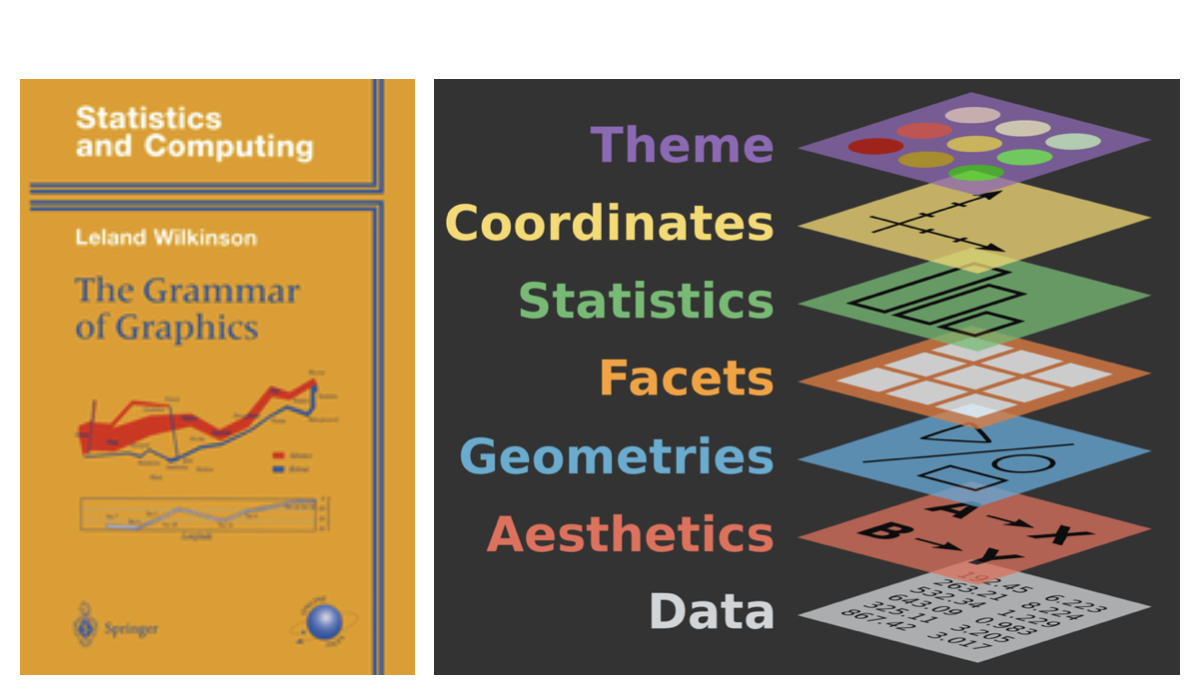
  • Inspired by the book Grammar of Graphics by Leland Wilkinson

Grammar of Graphics

A grammar of graphics is a tool that enables us to concisely describe the components of a graphic
Hello ggplot2!

  • ggplot() is the main function in ggplot2
  • Plots are constructed in layers
  • Structure of the code for plots can be summarized as
ggplot(
    data = [dataset], 
    mapping = aes(x = [x-variable], y = [y-variable])
  ) +
  geom_xxx() +
  other options
  • The ggplot2 package comes with the tidyverse
library(tidyverse)

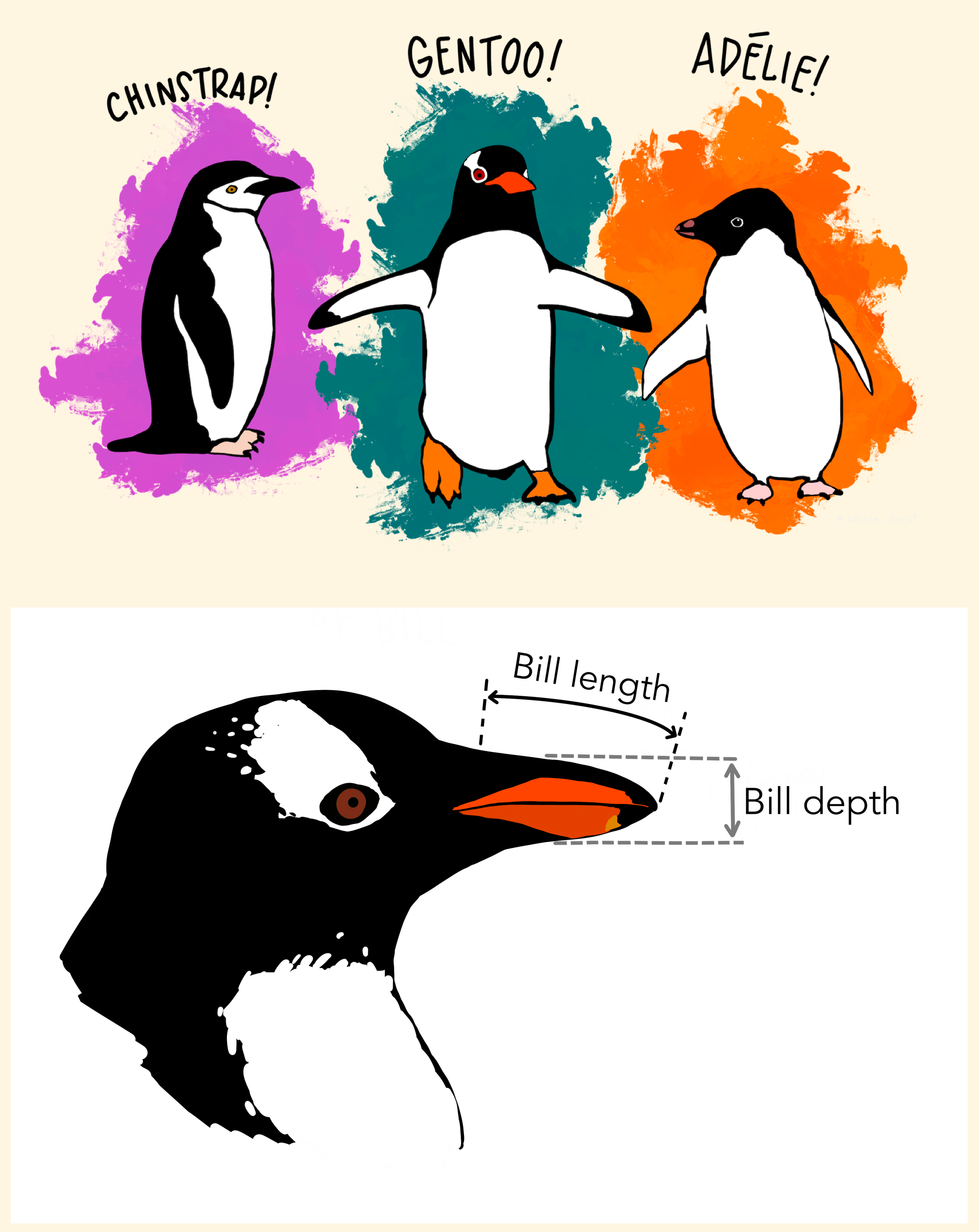
Data: Palmer Penguins

Measurements for penguin species, island in Palmer Archipelago, size (flipper length, body mass, bill dimensions), and sex.

library(palmerpenguins)

Attaching package: 'palmerpenguins'
The following objects are masked from 'package:datasets':

    penguins, penguins_raw
glimpse(penguins)
Rows: 344
Columns: 8
$ species           <fct> Adelie, Adelie, Adelie, Adelie, Adelie, Adelie, Adel…
$ island            <fct> Torgersen, Torgersen, Torgersen, Torgersen, Torgerse…
$ bill_length_mm    <dbl> 39.1, 39.5, 40.3, NA, 36.7, 39.3, 38.9, 39.2, 34.1, …
$ bill_depth_mm     <dbl> 18.7, 17.4, 18.0, NA, 19.3, 20.6, 17.8, 19.6, 18.1, …
$ flipper_length_mm <int> 181, 186, 195, NA, 193, 190, 181, 195, 193, 190, 186…
$ body_mass_g       <int> 3750, 3800, 3250, NA, 3450, 3650, 3625, 4675, 3475, …
$ sex               <fct> male, female, female, NA, female, male, female, male…
$ year              <int> 2007, 2007, 2007, 2007, 2007, 2007, 2007, 2007, 2007…
Goal
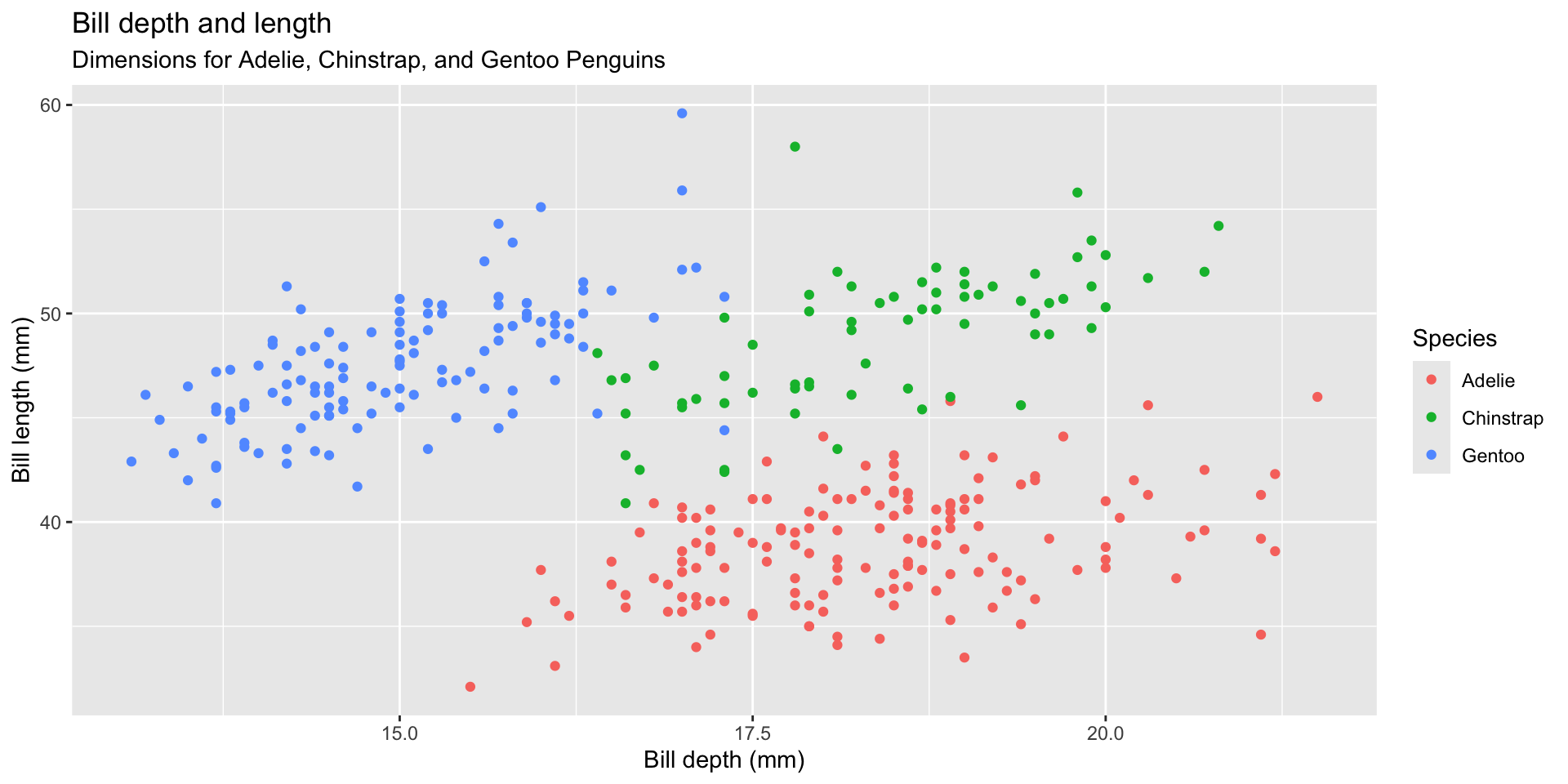
ggplot(
  penguins,
  aes(x = bill_depth_mm, y = bill_length_mm, color = species)
) +
  geom_point() +
  labs(
    title = "Bill depth and length",
    subtitle = "Dimensions for Adelie, Chinstrap, and Gentoo Penguins",
    x = "Bill depth (mm)", y = "Bill length (mm)",
    color = "Species"
  )

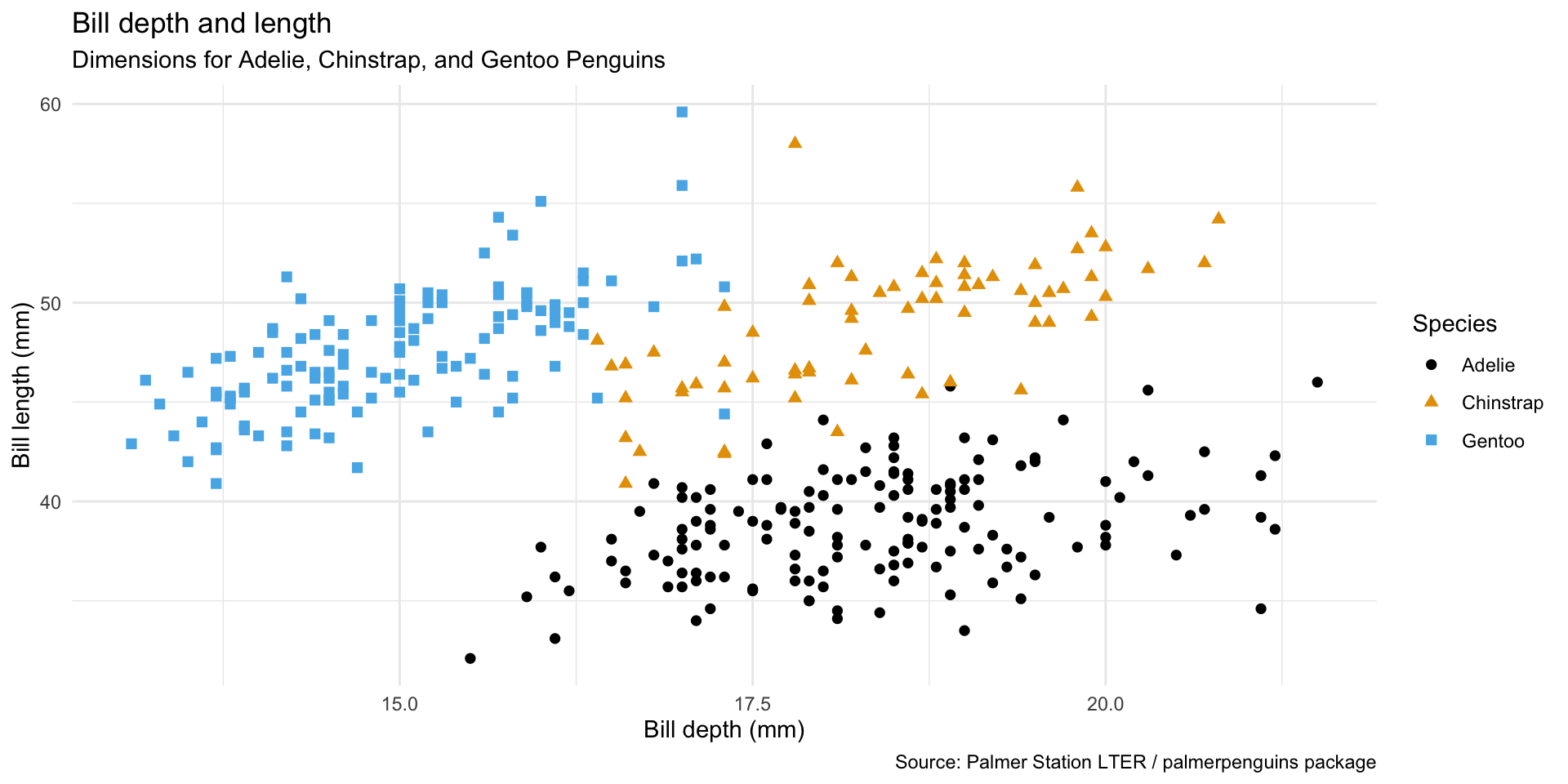
An improved goal

ggplot(
  penguins,
  aes(x = bill_depth_mm, y = bill_length_mm, color = species, shape = species)) +
  geom_point(size = 2) +
  labs(
    title = "Bill depth and length",
    subtitle = "Dimensions for Adelie, Chinstrap, and Gentoo Penguins",
    x = "Bill depth (mm)", y = "Bill length (mm)",
    color = "Species",
    shape = "Species",
    caption = "Source: Palmer Station LTER / palmerpenguins package"
  ) +
  theme_minimal() +
  ggthemes::scale_color_colorblind()

Start with the penguins data frame, map bill depth to the x-axis and map bill length to the y-axis.

Represent each observation with a point and map species to the color and shape of each point.

Title the plot “Bill depth and length”, add the subtitle “Dimensions for Adelie, Chinstrap, and Gentoo Penguins”, label the x and y axes as “Bill depth (mm)” and “Bill length (mm)”, respectively, label the legend “Species”, and add a caption for the data source.

Finally, use a discrete color scale that is designed to be perceived by viewers with common forms of color blindness.
Wrap up

This week’s tasks

  1. Create a GitHub account if you don’t have one

  2. Read the syllabus

  3. Instead of going to lab tomorrow:

    • Complete the Getting to know you survey on Canvas
    • Install R + Positron locally and/or make sure you can login in to the departmental server and initiate a Positron session (instructions to be posted later today)
  4. Complete the readings for next week